
Deploying Adobe Connect

Matt Davis
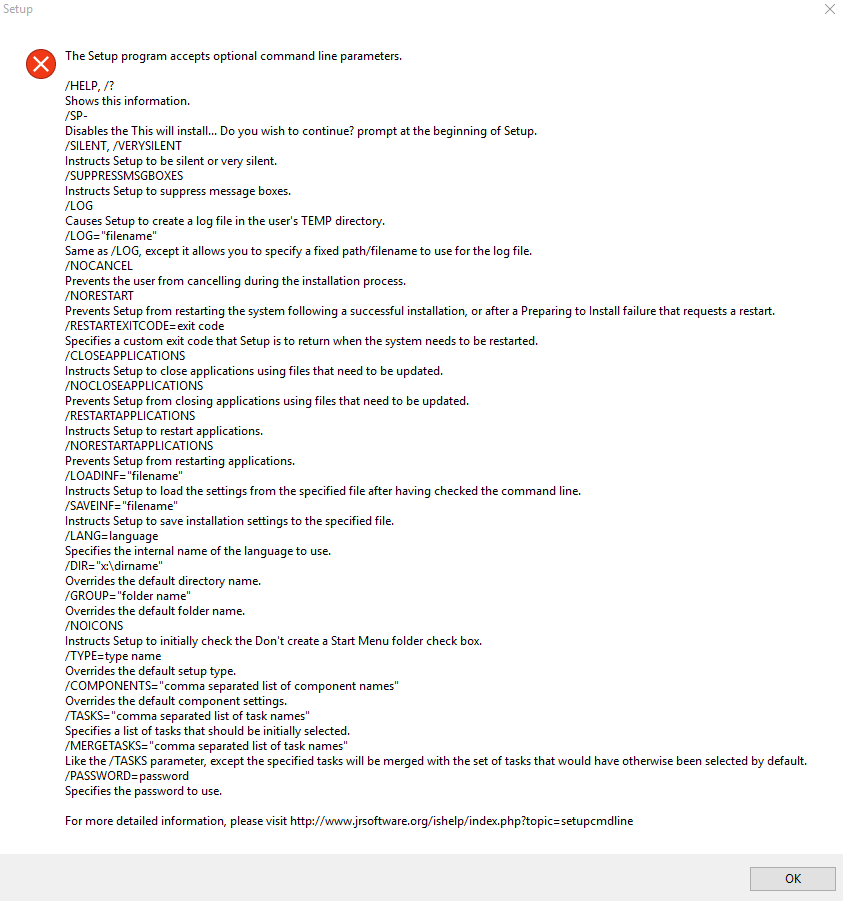
I am trying to deploy Adobe Connect 11.9.979.366 using PDQ Deploy 12 Pro Mode. I downloaded the AdobeConnectAddinInstaller.exe, got the parameters from the executable (see image below) and created a package to push to my users. I used the parameters /VERYSILENT, /SP- and /SUPRESSMSGBOXES. PDQ Deploy 12 Pro reports the installation as successful with no errors, but the software is not actually installed on the computer itself.
What I have tested:
- Tried to install the software using PDQ deploy with the /VERYSILENT, /SP- and /SUPRESSMSGBOXES switches. PDQ Deploy Pro 12 reports sucessful installation but the software is not installed.
- I have run the software executable manually on the machine to confirm that it does indeed install.
- I have tried running the installer from PDQ Deploy with no parameters to see if it would begin installation on the test machine (and I could confirm that it atleast started to install on the machine). It runs for quite a while and then times out.
Thoughts?
0
Comments
Try adding /LOG so you can see if it's complaining about something.
Output log confirmed that everything installed just fine.
2017-04-19 11:43:46.064 Log opened. (Time zone: UTC-05:00)
2017-04-19 11:43:46.065 Setup version: Inno Setup version 5.5.3 (a)
2017-04-19 11:43:46.065 Original Setup EXE: C:\WINDOWS\AdminArsenal\PDQDeployRunner\service-1\exec\AdobeConnectAddinInstaller.exe
2017-04-19 11:43:46.065 Setup command line: /SL5="$5009C,40476508,56832,C:\WINDOWS\AdminArsenal\PDQDeployRunner\service-1\exec\AdobeConnectAddinInstaller.exe" /VERYSILENT /SP- /SUPPRESSMSGBOXES /LOG="C:\Users\mdavis\Desktop\output.log"
2017-04-19 11:43:46.065 Windows version: 6.2.9200 (NT platform: Yes)
2017-04-19 11:43:46.065 64-bit Windows: Yes
2017-04-19 11:43:46.065 Processor architecture: x64
2017-04-19 11:43:46.065 User privileges: Administrative
2017-04-19 11:43:46.065 64-bit install mode: No
2017-04-19 11:43:46.067 Created temporary directory: C:\Users\tracker\AppData\Local\Temp\is-2CS8T.tmp
2017-04-19 11:43:46.112 Starting the installation process.
2017-04-19 11:43:46.113 Directory for uninstall files: C:\Users\tracker\AppData\Roaming\Macromedia\Flash Player\www.macromedia.com\bin\adobeconnectaddin
2017-04-19 11:43:46.113 Will append to existing uninstall log: C:\Users\tracker\AppData\Roaming\Macromedia\Flash Player\www.macromedia.com\bin\adobeconnectaddin\unins000.dat
2017-04-19 11:43:46.114 -- File entry --
2017-04-19 11:43:46.114 Dest filename: C:\Users\tracker\AppData\Roaming\Macromedia\Flash Player\www.macromedia.com\bin\adobeconnectaddin\unins000.exe
2017-04-19 11:43:46.116 Time stamp of our file: 2017-04-19 11:43:46.032
2017-04-19 11:43:46.116 Dest file exists.
2017-04-19 11:43:46.116 Time stamp of existing file: 2017-04-19 10:37:35.961
2017-04-19 11:43:46.116 Version of our file: 51.52.0.0
2017-04-19 11:43:46.116 Version of existing file: 51.52.0.0
2017-04-19 11:43:46.116 Installing the file.
2017-04-19 11:43:46.118 Uninstaller requires administrator: Yes
2017-04-19 11:43:46.206 Leaving temporary file in place for now.
2017-04-19 11:43:46.206 -- File entry --
2017-04-19 11:43:46.206 Dest filename: C:\Users\tracker\AppData\Roaming\Macromedia\Flash Player\www.macromedia.com\bin\adobeconnectaddin\adobeconnectaddin.exe
2017-04-19 11:43:46.206 Time stamp of our file: 2017-04-06 07:25:12.000
2017-04-19 11:43:46.207 Dest file exists.
2017-04-19 11:43:46.207 Time stamp of existing file: 2017-04-06 07:25:12.000
2017-04-19 11:43:46.207 Installing the file.
2017-04-19 11:43:46.957 Successfully installed the file.
2017-04-19 11:43:46.957 -- File entry --
2017-04-19 11:43:46.957 Dest filename: C:\Users\tracker\AppData\Roaming\Macromedia\Flash Player\www.macromedia.com\bin\adobeconnectaddin\digest.s
2017-04-19 11:43:46.957 Time stamp of our file: 2017-04-06 07:25:12.000
2017-04-19 11:43:46.957 Dest file exists.
2017-04-19 11:43:46.957 Time stamp of existing file: 2017-04-06 07:25:12.000
2017-04-19 11:43:46.957 Installing the file.
2017-04-19 11:43:46.959 Successfully installed the file.
2017-04-19 11:43:46.959 -- File entry --
2017-04-19 11:43:46.959 Dest filename: C:\Users\tracker\AppData\Roaming\Macromedia\Flash Player\www.macromedia.com\bin\adobeconnectaddin\CefPackage.zip
2017-04-19 11:43:46.960 Time stamp of our file: 2017-04-06 07:25:12.000
2017-04-19 11:43:46.960 Dest file exists.
2017-04-19 11:43:46.960 Time stamp of existing file: 2017-04-06 07:25:12.000
2017-04-19 11:43:46.960 Installing the file.
2017-04-19 11:43:50.548 Successfully installed the file.
2017-04-19 11:43:50.607 Installation process succeeded.
2017-04-19 11:43:50.607 Need to restart Windows? No
2017-04-19 11:43:50.608 Deinitializing Setup.
2017-04-19 11:43:50.612 Log closed.
So I have figured out what is going on but not sure how to fix it.
In our test environment, we use an account with administrator privileges on the machine. Adobe Connect did indeed install but only for that account. PROGRAMS AND FEATURES for the administrator account shows Adobe Connect being installed (confirmed when I ran the Adobe Connect Meeting Test Page) but when I log in to the test machine with another account, Adobe Connect is not installed.
Give this a read: https://blogs.adobe.com/connectsupport/installing-add-in-for-all-user-profiles/