
Java 7 Update 51 deploy with exceptions

Ian Empson
Hello
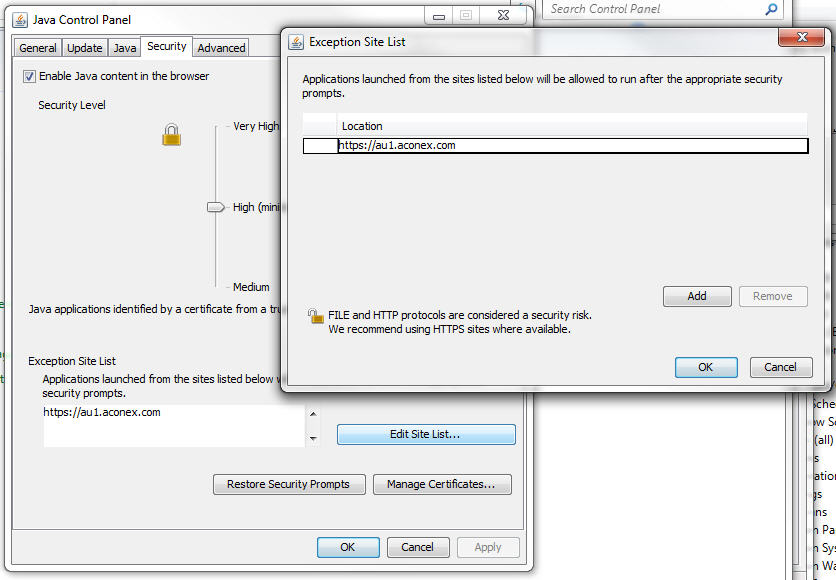
Is there a way to deploy Java updates and include (or add afterwards), a step that includes web site exceptions? A website java app is blocked without adding this exception manually.
regards and thanks
Java_7u51_Exceptions.jpg
0
Comments
Hi Ian, we're looking now at the Deployment Configuration File and Properties with Java 7 Update 51. It seems that this is possible using the system-level deployment.properties file, but we need to do more testing. We'll keep you posted on what we find. In the meantime, here are the URL's we are researching:
http://docs.oracle.com/javase/7/docs/technotes/guides/jweb/properties.html
http://docs.oracle.com/javase/7/docs/technotes/guides/jweb/exception_site_list.html
https://blogs.oracle.com/java-platform-group/entry/upcoming_exception_site_list_in
Thanks Shawn - appreciate your efforts on this new Java issue.
ps. apologies for sending two separate messages - unfamiliar with the discussion group blog and wasn't certain if I had submitted it properly
Here is how we solved problem with Java exception.
On Win7/Vista file containing exceptions is %USERPROFILE%\AppData\LocalLow\Sun\Java\Deployment\security named exception.sites.
On XP it is in %USERPROFILE%\Application Data\Sun\Java\Deployment\security.
Simply edit file, add sites (must contain full name like https://www.google.com/. Then create deployer (or modify existing Java deployer to include next steps:
Include exception.sites in deployer.
1. Step 1 - OS version is Windows 7/Vista command is - copy exception.sites %USERPROFILE%\AppData\LocalLow\Sun\Java\Deployment\security /y.
Critical is to modify step to run as logged user.
2. Step 2 - OS version is XP command is - copy exception.sites "%USERPROFILE%\Application Data\Sun\Java\Deployment\security" /y. Also deploy as logged user.
That should do it.
Thanks Kresimir. That will save me some time.
regards
Postscript
I found that I needed to add a full path to the source for the deployment to work. It also didn't seem to work when I attempted to source it from my Users/Appdata folder so I copied the exception.sites file to a shared drive as below and ran it successfully. I also added the quote marks to each path just to be sure...
copy "M:\_aUpdates\Java\exception.sites" "%USERPROFILE%\AppData\LocalLow\Sun\Java\Deployment\security\" /y
regards and thanks again