
Filtering out Old Adobe Flash PCs

Cheung, James
Hi,
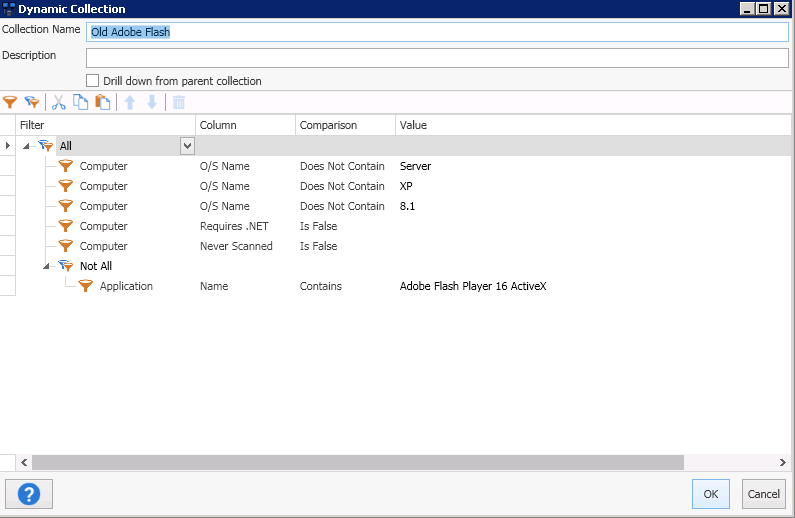
I am trying to show all the PCs with versions of Adobe Flash less than version 16 but I am stuck. Can anyone help? I have attached a screenshot of what I am doing.
Thanks,
James
old adobe flash version.PNG
0
Comments
The filters you are using will only show you computers that have version 16.x of Adobe Flash Player ActiveX. If you want to see computers that have lower than 16 you would need to use the Version Lower Than comparison and remove the 16 from the Application Name. This means you would want to use the Matches Pattern comparison on the Name. When you use a Matches Pattern you should use an asterisk * where the 16 is.
Just a heads up, the latest version of Flash (as of the writing) is 18.0.0.194. To find all old Flash ActiveX machines change the Lower Than to this value.
Hi Shane,
Thanks for your quick response. I have done exactly as displayed however, it does not seem to be working. I still see PCs with Adobe Flash Player 17 installed. Your assistance is appreciated.
Hi James,
Will you post a screenshot of the Applications page on one of these systems? To prevent showing all the applications type the word flash in the top filter. (see below) I suspect you have two versions of Flash installed. This can happen if one version was installed with the EXE and another with an MSI.
I think I figured it out. I used your filters and I changed the Version to Version Not lower than and it seems to be working. Thanks!