
Having issues filtering with Inventory

DeFoor, Leslie
Okay, first let me start by saying I am pretty new to PDQ Deploy and Inventory.
I am trying to create a Dynamic Filter off of all my computers for computers that DO NOT have our Anti Virus (WebRoot).
First, I found a computer which has WebRoot installed to get the exact name of the application.
Then I created a dynamic filter
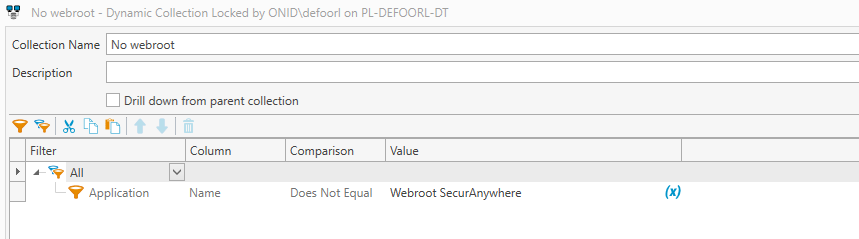
When I run this, or when it updates, it still brings in computers which have it installed.
I have also attempted to change the Comparison from DOES NOT EQUAL to a few of the others that would say does not...and I still get the same results.
Thanks for any advice you might have.
0
Comments
That's because your search finds computers that have the many applications installed that aren't named webroot SecurAnywhere
You should try a filter of "Not Any" Application Name contains Webroot SecurAnywhere.
That will list the ones that don't have it.
GrantG, your explanation helped me fix a collection issue I've been struggling to solve for a few days.
Using "not any" with the comparison contains vs. "any" with the comparison does not contain makes so much more sense.
Thanks!