
PDQ Inventory - how does it get the applications list?

Dave Underwood
What does the scanner check on the clients to populate the Applications list?
Ex. Regkey? hlm\software\microsoft\windows\current version\uninstall ?
0
Comments
According to PDQ Inventory User, Documentation Application scanner does the following through the registry
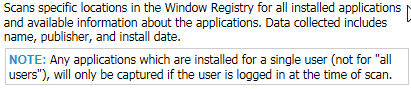
You can find the Documentation while in Inventory, Press F1 > Scanning Computers > Scanners > Scanner Details
Thank you Callan. I was hoping to get the specific reg keys checked, as I have a client in particular that PDQ reports that this machine has a very old version of Mozilla installed in a profile. I have created a an uninstaller that runs as the "user logged in" and have been successful on most machines. This machine, however, I can not find anywhere on the machine any traces of this old version of Mozilla. I must be missing the correct RegKeys....
HKU\ SID \Software\Microsoft\Windows\CurrnetVersion\Uninstall
Should be able to search in there and find a piece of software. The SID can then used to find our the username by going to..
HKLM\Sotware\Microsoft\Windows NT\CurrentVersion\ProfileList