
Report filter not working properly

Wayne Osteen
I know this should work, but it's not. Any ideas?
I want to know machines where *both* applications are installed. Either filters properly, both does not.
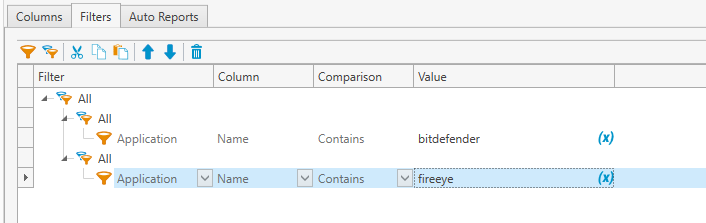
Thanks!
Wayne
1
Comments
Wayne,
Interesting find, I don't know why this isn't working. I tried every permutation I could think of with the group filters and I couldn't get it to work. I also tried several different types of SQL reports and couldn't get it.
The weird thing is that these exact same filters work for a collection, but not for a report. As I see it, you have a few options:
I would open a support case with PDQ as well-- this is probably a bug, given that it works for a collection but not for a report. For reference, my PDQ Inventory version is 17.1.0.0 Enterprise Mode and I was able to reproduce your issue.
Thanks for the second set of eyes Luke! I created a collection and it did indeed work.
I'm opening a ticket right now with support. Cheers!