
PDQ Inventory_Release_18.1.38.0 Won't Launch!!! UGH!!!

Kevin Pentecost
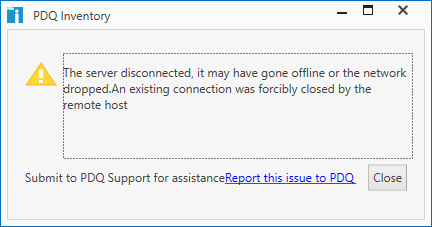
I've reinstalled several times, and still keep getting this nonsense. What is going on?
OH, side note...I also upgraded to the same version of PDQ Deploy and it's working just fine. The issue is ONLY with the Inventory module.
1
Comments
MORE DETAIL FROM THE ERROR LOG:
AppDomain : PDQInventoryConsole.exe
CLR Version : 4.0.30319.42000
Comments :
Current AppDomain : PDQInventoryConsole.exe
Database : C:\ProgramData\Admin Arsenal\PDQ Inventory\Database.db
Date : 2019-11-15T20:12:54.7968935Z
Email :
Entry : C:\Program Files (x86)\Admin Arsenal\PDQ Inventory\PDQInventoryConsole.exe
Error : The server disconnected, it may have gone offline or the network dropped.
Error Type : AdminArsenal.Protocol.ServerDisconnectedException
License Mode : Enterprise Mode
Manufacturer : LENOVO (20JDCTO1WW)
Memory : 16 GB (9 GB free)
PID : 1620
Process : PDQInventoryConsole
Product : PDQ Inventory
SentryEnabled : True
Service Mode : Server
Subject : Warning Report
Version : 18.1.38.0
Windows : Microsoft Windows 10 Pro (10.0.16299)
The server disconnected, it may have gone offline or the network dropped.
AdminArsenal.Protocol.ServerDisconnectedException
------- INNER EXCEPTIONS -------
An existing connection was forcibly closed by the remote host
System.Net.Sockets.SocketException
NativeErrorCode: 10054
at System.Net.Sockets.Socket.Receive(Byte[] buffer, Int32 offset, Int32 size, SocketFlags socketFlags)
at System.ServiceModel.Channels.SocketConnection.ReadCore(Byte[] buffer, Int32 offset, Int32 size, TimeSpan timeout, Boolean closing)
------- OUTER EXCEPTION -------
The server disconnected, it may have gone offline or the network dropped.
AdminArsenal.Protocol.ServerDisconnectedException
at AdminArsenal.Protocol.ServerConnectionException.ThrowIfDown(Exception ex)
at AdminArsenal.Protocol.ClientConnection..ctor(ProtocolClient client, Binding binding, EndpointAddress endpoint, Action`1 addCustomHeaders)
at AdminArsenal.Protocol.ClientConnectionPool.Checkout(Action`1 addCustomHeaders)
at AdminArsenal.Protocol.ProtocolClient..ctor(String name, String address, String identity, NetworkCredential credentials, Action`1 addCustomHeaders)
--- End of stack trace from previous location where exception was thrown ---
at System.Runtime.ExceptionServices.ExceptionDispatchInfo.Throw()
at AdminArsenal.Protocol.ProtocolClient..ctor(String name, String address, String identity, NetworkCredential credentials, Action`1 addCustomHeaders)
at AdminArsenal.ProductProtocolClient..ctor(String name, Boolean requireTcp, AALicense newLicense)
at AdminArsenal.PDQInventory.InventoryProtocolClient.Initialize(Boolean requireTcp, AALicense newLicense)
at AdminArsenal.Application.ProductApplication.InitializeProtocolClientInternal()
at AdminArsenal.Application.ProductApplication.Application_Startup(Object sender, StartupEventArgs e)
Please open a ticket with support@pdq.com
Unfortunately, that error message is only a symptom, not the cause. Our Solutions team will walk you through digging into the logs to find the underlying error.