
PDQ Deploy - Inventory collection membership issue

Hello,
1. I have created 3 collections in PDQ Inventory, which indicate DELL command update version.
2. I created uninstall package for each of them.
3. I created a package which install the latest version of dell command update
4. Now i combined these things in one package. So in summary there are 4 steps (3 for uninstallation and one for installation):

In every uninstall package the conditions are: Is a member of PDQ inventory collection (i selected applicable collection for every version, to match uninstaller) and in options the error mode is set as continue in each step as below:

The deployments are stopping always with error on 1st step (except computers with version 2.4) :
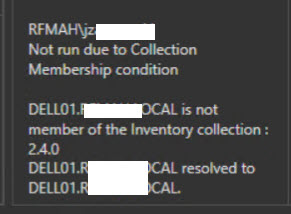
The deployment in computers with version 2.4 of DCU works as expected (unncessary steps are skipped):

Is this some sort of bug ? What can be the reasons of mentioned behavior ?
Regards,
JŻ
Comments
I tried to reproduce this issue, but I was unable to.
Do you have the latest version of Deploy and Inventory installed, 19.0.40.0?
If you can, please export that package and post the contents of the XML file here.
Hi Colby,
Both Deploy and Invetory are in version 19.0.40.0.
Below you can find link to xmls for package & inventory membership of computer which doesn't belong to 2.4.0 collection (and deployment fails).
https://chmura.rfmah.pl/s/WGwdpQgDxfaFqrE
Regards,
JŻ
I believe it's because you have the Collection Condition set at the package level (Properties --> Conditions) for "2.4.0".
Also, you could use this script to build a version-independent uninstall package: https://github.com/Colby-PDQ/Uninstall-Packages/blob/master/Scripts/Uninstall-MSI-By-Name.ps1
Here are a few examples: https://github.com/Colby-PDQ/Uninstall-Packages/tree/master/Packages
Colby you are completely right :). I have no idea how could i not see it...
Thank you for sharing powershell solution.
Regards,
JŻ