
Filtering inventory based on computer model

I am trying to use a dynamic collection to isolate 4 models of computers out of 11 we have in production. And then I want to see if the 4 models have the latest video driver (since they all use the same driver). The only way I can get it to work is by having a bunch of filters of all the models I don't want. If I try to do a "Contains 5580" new line "Contains 5590" I get no results.
The other thing is, I can filter by the driver version for the video driver for computers that contain that driver but I can't get a list of computers that don't have the driver as well. So I'm trying to make two collections ideally, one that has the 4 models and is lower than the current driver and then another collection that has the same 4 models and is equal to the current driver.
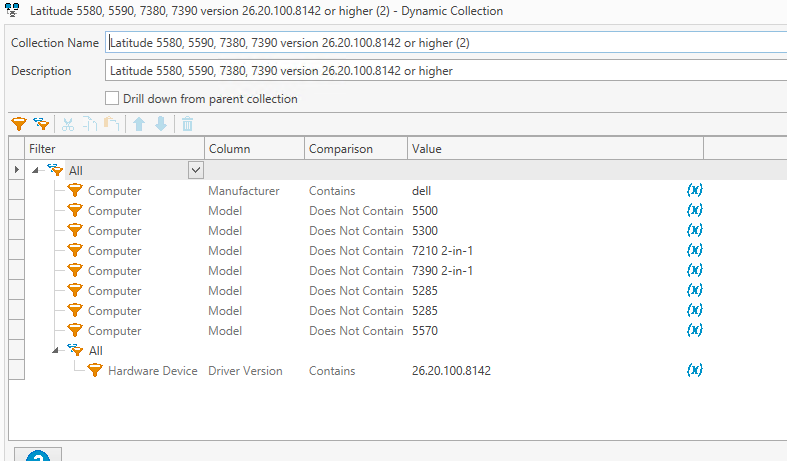
The image below does get me the results (models 5580, 5590, 7380 and 7390 that have the 26.20.100.8142 video driver) but it just seems like a messy way to do it. I can't figure out how to get the same models that don't have that version to come up.
Thanks
Comments
I suspect you must have had an "All" with entries for the 5580 and the 5590.
That would mean it would have to contain both for it to match. You'd want an "Any" so it could match either one.
Try this
For more advanced fun, you could use a PDQ custom variable, where you define the driver version.
And use that in the collection settings. So you could update multiple collections with one change, when your desired driver version changes, without having to go change every collection individually.
I recommend setting up 3 collections. You can download this XML file and import it, or recreate them from the screenshots below.
Awesome that worked. Thanks guys for the help.