
Search AD for Servers missing a specific Windows Update

Visal Le
Hello,
I am trying to use PDQ Inventory to give a report of all the servers without a specific Windows Update. I have tried following the two following articles/forum but have not been successful.
https://help.pdq.com/hc/en-us/articles/115000350172-Identify-Machines-that-Require-a-Specific-Windows-Microsoft-Update
https://help.pdq.com/hc/en-us/community/posts/360052722571-Using-PDQ-Inventory-to-get-a-report-to-see-if-a-specific-Windows-Update-has-been-installed-?input_string=Search%20AD%20for%20Servers%20missing%20a%20specific%20Windows%20Update
Each time I run the report, it finds servers that already have the specific KB# installed and the servers that do not have it installed.
0
Comments
Hot Fixes have a many-to-one relationship with computers, so you have to use Group Filters:
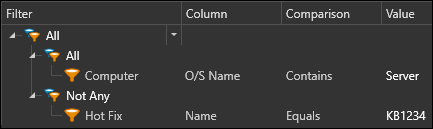
This Filter says "show me computers where Not Any of the Hot Fix Names Equal 'KB1234'".
To also filter it down to server OSs:
Hello Colby,
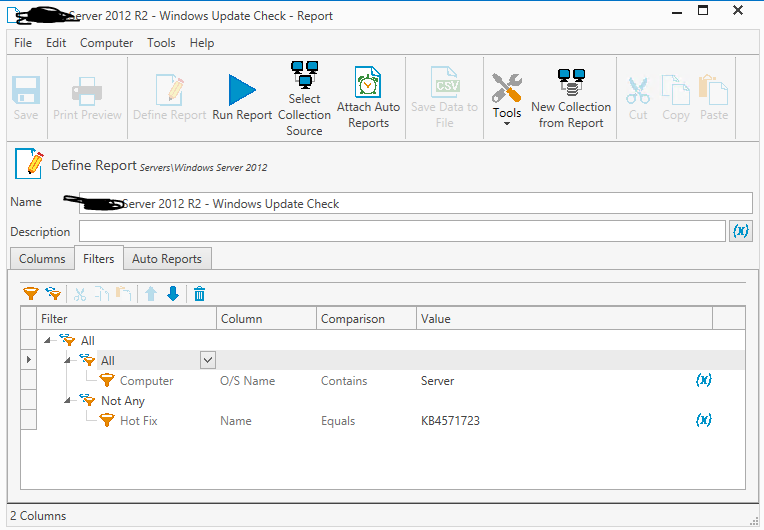
I have followed those guidelines and I am still getting computers that I have confirmed to have those Hot Fixes.
Any other suggestions?
Oops. You mentioned building a Report, but I built a Collection. Report filtering gets weird when you have multiple tables. I recommending building a Collection with those filters and targeting your Report to it.
See this comment for more details: https://help.pdq.com/hc/en-us/community/posts/360056822192/comments/360009190492
I have tried that as well and it did not work correctly.
Can you give me a guide on how to create the Collection and the Report?