
Filter not reporting what I would expect

Craig Mohr
I have this filter
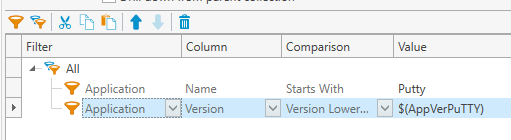
and its reporting the version as 0.75 in the variable (this is from the PDQ repo)
Yet this machine is in the collection and I'm not sure why?

I have rescanned it twice trying to make it go away.
1
Comments
What version of PDQ Inventory are you on? Perhaps try restarting the Background Service.
I was unable to reproduce this issue. I installed PuTTY on a machine, and it does not show up in the collection. I conducted my test in 19.3.41.0.
19.3.33.0 We are in central console mode and it says I can't restart the service but we did just restart the server about an hour ago. What's weird is there are lots of other putty users who are not showing up and are also at 0.75. I figured it was maybe seeing some other app because I had done the filter incorrectly.
Does the stubborn computer show up in the "PuTTY 64-bit (Old)" Collection in the Collection Library?
No it shows in latest (didn't even see those) so like what? only thing different is the variable name for putty. I have 2 pc's showing in mine that are updated and not in old.
Are there any other applications on the troublesome computers that contain "PuTTY"? Your "Starts With" Filter should be working, but I'm curious if it's somehow catching something else.
I didn't see anything on one of the PC's but the other one has "extraPutty" but they both have a ton of apps so it's possible I missed it. I switched it from contains to starts with for just that reason as I have seen that specific problem.