
How can I deploy a script 1 time and catch PC's as they come online?

Craig Mohr
I am trying to deploy a power config setting to turn off sleep on power to all PC's. The deployment itself works but I have a lot of PC's that are remote or online only at certain times so I am catching these with the heartbeat trigger. Problem is this seems to also be redeploying the script over and over to some machines. Is there a way to deploy this to every machine and only once? I am trying to avoid scanning the registry to verify especially since power config registry settings are just nuts to figure out.
1
Comments
Have you tried this?
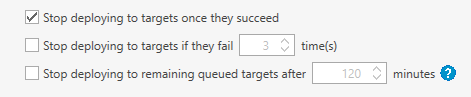
I always used dynamic collections for stuff like this. At one time, I had RDP messed up after windows patch. I had to create a dynamic collection using a registry scan. One collection was for RDP not enable and one was for RDP enabled. My job targeted RDP not enabled. Also, on your schedule Click on Option and there is an option to stop deployment to targets once they succeeded.
Yes I did try the stop deploying but I still see 1 machine that's had it applied 4 times now.
I thought about the collections thing but really checking power config settings in the registry is beyond a nightmare. I would almost have to/rather set my own registry key to signify its been done.
Are you using dynamic collections?
No, see my edit.
you can set up a registry scan. I had to do that with my RDP nonsense. Let me know if you want details on registry scan and I can share screen shots and dynamic collection settings. I find dynamic collection is best way to go.
I will probably just setup a custom registry key in HKLM to signify some of this stuff then. We have thought about doing it before for other changes anyhow. Thanks.
Just curious, what registry setting are you modifying to stop sleep on power? Are you modifying here HKEY_LOCAL_MACHINE\SOFTWARE\Microsoft\PolicyManager\default\Settings\AllowPowerSleep and adding a key there?
I'm not. I am using a powercfg command because the registry keys don't seem to be consistent across windows versions.